rcore_television | RCore Television
Server-synced 3D TV streaming for ESX, QBCore, Qbox servers
rcore_television | RCore Television
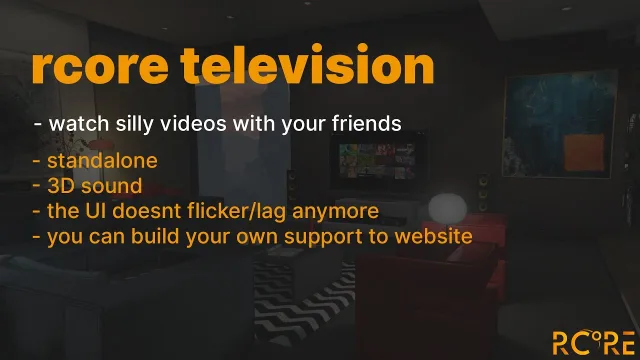
Take a break from a long day and watch some of your favorite TV shows/movies with friends/alone.
Feature list
- 3D sound
- All is server synced
- Time is synced with other players
- Can run on any framework
- Can play any song from direct URL / Livestream / radio stream
- Option to set default volume for player
- Option to change all commands label
- Option to change the distance for certain TV (a way how to make cinema)
- Option to have a whitelist for URL
- Option to have a blacklist for URL
- Option to make custom support for the website in config
- Option to have default playlist in TV
- Option to add new TV into config
- Option to lock TV model for a certain job only
rcore_television | RCore Television installation for FiveM servers
rcore_television | RCore Television is a FiveM script from RCore Tebex in the ESX Scripts category.
After checkout, download the resource package from your Tebex order email, upload the included folder to your server, and start it from server.cfg.
resources/ directory.
ensure line using the exact folder name shipped in the download.
Use this as the server.cfg pattern. Replace the folder name if your downloaded resource folder is different:
ensure rcore-television-rcore-televisionThe previous generated tebex-... prefix has been removed here because the real folder name is controlled by the download package, not by this product page.
Why rcore_television | RCore Television fits a FiveM server
Framework labels for this listing: esx, qbcore, qbox. Check the included readme for any product-specific setup notes.
rcore_television | RCore Television compatibility and specs
Related scripts




![Lore-Friendly Police Vehicle Pack [8 Vehicles]](/uploads/card/9d6c5ae77714e63c6b00c1694bd0506c.webp)





About this FiveM script
rcore_television | RCore Television is a premium FiveM script for esx, qbcore, qbox servers. It’s part of the Tebex catalog, a curated selection of battle-tested resources for QBCore, ESX and Qbox roleplay servers. Every script on Tebex ships with lifetime updates, instant email delivery, and a ticket system for technical support.
Whether you’re building a QBCore server from scratch, upgrading an ESX Legacy deployment, or migrating to Qbox, this resource drops in cleanly and runs at 0.00ms idle resmon. The config-first design means you can customize prices, permissions and locations without touching the core Lua.