Electus Admin
Browser-based admin menu with full framework and inventory control
Electus Admin
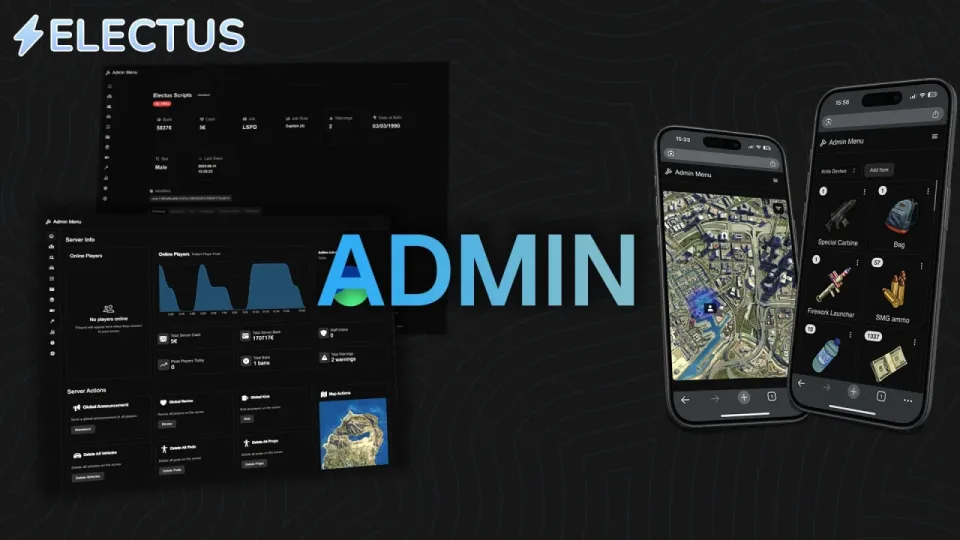
The most advanced FiveM admin script. This admin menu integrates with frameworks and inventories and browser/website support without logging into FiveM.
Features of Electus Admin :
- Browser/Mobile Support
No additional installation required to make it work inside your browser or mobile!
- Inventory Integration
The admin menu integrates with the inventory system of your choice regardless of the player being online or not.
- Framework Integration
You can edit money, job, name and much more on offline and online players without logging into your server.
- Garage Integration
Interact with vehicles both on the server and in garage.
- Spectating
Spectate players IN YOUR BROWSER which also includes voice audio!
- Item Database
See who has which items and manage them.
- Live Map
See who is online and where they are on a live map. Interact with them on the integrated map.
- Player Interaction
Online actions for players has tons of features.
- Penalties (Ban/Warnings)
Ban players and warn players.
- Server Actions
Global actions such as announcements, revive, delete props, delete peds, delete vehicles, freeze players, set time, mute players and more.
- Statistics
Track player count, item count, server balance and player job count.
- Alerts
Create staff alerts for item, vehicle and balance count.
- Permissions
Create permissions for your staff and assign them to your staff members.
Usage :
- Admin Menu
Players can access the admin menu with /adminmenu or inside a browser via the link provided.
Important Details for Electus Admin:
- Resmon
This script is very optimized and uses very little resources. Idle is 0.00ms with excellent performance on load.
- Requirements
This script requires ESX, QB-Core or QBOX, ox_lib and oxmysql
- Inventory Support
qs-inventory, ox_inventory, qb-inventory and more
- Support
All scripts always comes with free and fast support through discord.
- Updates
This script comes with free updates and complete rewrites/versions.
Electus Admin installation for FiveM servers
Electus Admin is a FiveM script from Electus Scripts Tebex Store in the FiveM resources category.
After checkout, download the resource package from your Tebex order email, upload the included folder to your server, and start it from server.cfg.
resources/ directory.
ensure line using the exact folder name shipped in the download.
Use this as the server.cfg pattern. Replace the folder name if your downloaded resource folder is different:
ensure electus-adminThe previous generated tebex-... prefix has been removed here because the real folder name is controlled by the download package, not by this product page.
Why Electus Admin fits a FiveM server
Framework labels for this listing: esx, qbcore, qbox. Check the included readme for any product-specific setup notes.
Electus Admin compatibility and specs
Related scripts









About this FiveM script
Electus Admin is a premium FiveM script for esx, qbcore, qbox servers. It’s part of the Tebex catalog, a curated selection of battle-tested resources for QBCore, ESX and Qbox roleplay servers. Every script on Tebex ships with lifetime updates, instant email delivery, and a ticket system for technical support.
Whether you’re building a QBCore server from scratch, upgrading an ESX Legacy deployment, or migrating to Qbox, this resource drops in cleanly and runs at 0.00ms idle resmon. The config-first design means you can customize prices, permissions and locations without touching the core Lua.