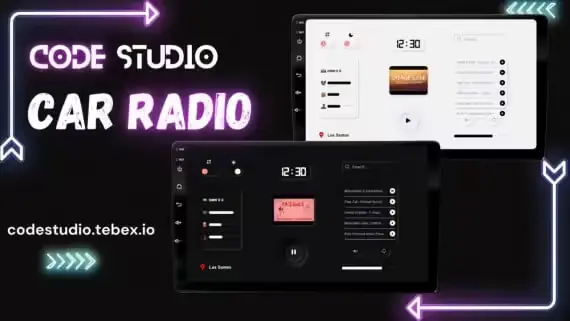
Car Radio Script with Control UI
Car Radio Script with Control UI
Showcase :
Features :
- A complete Standalone Script.
- Completely Server Synced
- Modern UI + Responsive to all screen resolutions
- Available in Dark and Light Theme
- Works with Xsound to play any music
- You can control the music - Pause, Play, Volume, Mute & Loop
- You can change the music range which comes out of the vehicle or restrict it to play inside the vehicle only
- Comes with a small music overlay UI
- Opening of UI can be configured from 3 Different modes
- Passengers can also access the radio [You can change this in config]
- Newly added songs will go into the recently played list
- Doesn't Require any Database + music data stored locally for excellent optimization
- Doesn't Lag at higher speeds
- Music will stop if the vehicle gets deleted
- You can Whitelist or Blacklist vehicles
- Highly Optimized [0.00ms]
- Highly Configurable config
- Language Editor
- For More Features Check Config Below
Events
Event to Toggle Radio UI:
TriggerEvent("cs:carRadio:openUI", true)
Optimization
0.00 ms in a quiet state
0.00 ms in an active state
Quick setup
Drop the resource folder into resources/ and add this line to server.cfg:
ensure tebex-car-radio-script-with-control-uiRequired dependencies (all free, install once and reuse across every Tebex script):
Compatibility & specs
Related scripts





About this FiveM script
Car Radio Script with Control UI is a premium FiveM script for esx, qbcore, qbox servers. It’s part of the Tebex catalog, a curated selection of battle-tested resources for QBCore, ESX and Qbox roleplay servers. Every script on Tebex ships with lifetime updates, instant email delivery, and a ticket system for technical support.
Whether you’re building a QBCore server from scratch, upgrading an ESX Legacy deployment, or migrating to Qbox, this resource drops in cleanly and runs at 0.00ms idle resmon. The config-first design means you can customize prices, permissions and locations without touching the core Lua.