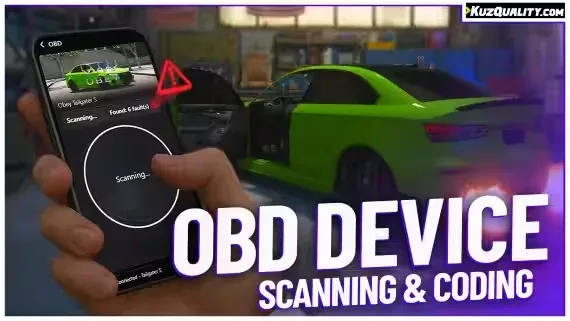
FREE OBD Car Device
Scan faults, code mods, and read live data in-game
FREE OBD Car Device
Experience authentic on-board diagnostics and vehicle coding with our OBD Device. Scan any vehicle to reveal stored faults, monitor vehicle data in real-time, and apply hidden software customizations. Comes fully standalone or plug-and-play with popular phone scripts
Features of FREE OBD Car Device :
- Realistic OBD Device UI
- Scan your vehicle for faults
- Pre-made fault logging system with 10+ faults
- Add your own faults through an export, perfect to use from external scripts
- Modify your vehicle, choose from 15+ pre-made mods and add easily add your own
- Read live-data of your car
- Official integration with t1ger_mechanic script
- Built-in integrations for all popular phone systems, such as: lb-phone, yseries phone, GKSPhone v2 and lb-tablet
- Full localization system allowing you to translate anything you'd like
Compatibility
- STANDALONE
- VRP
This resource will work flawlessly on all servers. Including ESX, QBCore, QBox, VRP as well as servers running no frameworks at all
- KQ_LINK Required
kq_link is our fully open-source solution to link resources with any framework or dependency you may be using, such as inventories, notifications or dispatch systems. Ensuring the best possible compatibility between our new resources and your server.
You can find out which resources are supported on the Github page and in Downloads
FREE OBD Car Device installation for FiveM servers
FREE OBD Car Device is a FiveM script from KuzQuality in the ESX Scripts category.
After checkout, download the resource package from your Tebex order email, upload the included folder to your server, and start it from server.cfg.
resources/ directory.
ensure line using the exact folder name shipped in the download.
Use this as the server.cfg pattern. Replace the folder name if your downloaded resource folder is different:
ensure free-obd-car-deviceThe previous generated tebex-... prefix has been removed here because the real folder name is controlled by the download package, not by this product page.
Why FREE OBD Car Device fits a FiveM server
Framework labels for this listing: esx, qbcore, qbox. Check the included readme for any product-specific setup notes.
FREE OBD Car Device compatibility and specs
Related scripts










About this FiveM script
FREE OBD Car Device is a premium FiveM script for esx, qbcore, qbox servers. It’s part of the Tebex catalog, a curated selection of battle-tested resources for QBCore, ESX and Qbox roleplay servers. Every script on Tebex ships with lifetime updates, instant email delivery, and a ticket system for technical support.
Whether you’re building a QBCore server from scratch, upgrading an ESX Legacy deployment, or migrating to Qbox, this resource drops in cleanly and runs at 0.00ms idle resmon. The config-first design means you can customize prices, permissions and locations without touching the core Lua.