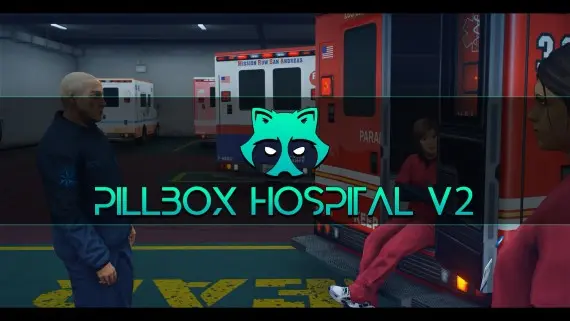
Gabz Pillbox Hospital MLO – FiveM EMS & Medical RP Interior
The iconic Gabz Pillbox Hospital interior with reception, treatment and staff areas — the EMS hub your medical roleplay has been missing.
If your city runs EMS, it runs through Pillbox. This is the hospital interior half your players already know from RP clips — rebuilt by Gabz with a proper check-in desk, treatment areas and the staff-side rooms that give medical roleplay somewhere real to happen.
For server owners the win is workflow: bed spots for your ambulance job's revive and check-in logic, a reception that anchors civilian walk-ins, and corridors long enough that wheeling a gunshot victim through them feels like an actual scene rather than a teleport. Your medics will spend whole shifts here — some of them voluntarily.
Feature rundown
- Reception and check-in area for walk-in RP
- Treatment and operating spaces for full medical scenes
- Bed placement that suits qb-ambulancejob and esx_ambulancejob setups
- Staff-side rooms and corridors for doctor and nurse roles
- The recognisable Pillbox layout players expect from big RP cities
Standalone map, compatible with QBox, QBCore and ESX. Optimised streaming, instant digital download, and Cfx.re escrow protection.
Gabz Pillbox Hospital MLO – FiveM EMS & Medical RP Interior installation for FiveM servers
Gabz Pillbox Hospital MLO – FiveM EMS & Medical RP Interior is a FiveM MLO map from Gabz Maps Tebex in the FiveM MLOs & Maps category.
After checkout, download the resource package from your Tebex order email, upload the included folder to your server, and start it from server.cfg.
resources/ directory.
ensure line using the exact folder name shipped in the download.
Use this as the server.cfg pattern. Replace the folder name if your downloaded resource folder is different:
ensure gabz-pillbox-hospital-mloThe previous generated tebex-... prefix has been removed here because the real folder name is controlled by the download package, not by this product page.
Why Gabz Pillbox Hospital MLO – FiveM EMS & Medical RP Interior fits a FiveM server
Gabz Pillbox Hospital MLO – FiveM EMS & Medical RP Interior compatibility and specs
Related scripts





About this FiveM script
Gabz Pillbox Hospital MLO – FiveM EMS & Medical RP Interior is a premium FiveM script. It’s part of the Tebex catalog, a curated selection of battle-tested resources for QBCore, ESX and Qbox roleplay servers. Every script on Tebex ships with lifetime updates, instant email delivery, and a ticket system for technical support.
Whether you’re building a QBCore server from scratch, upgrading an ESX Legacy deployment, or migrating to Qbox, this resource drops in cleanly and runs at 0.00ms idle resmon. The config-first design means you can customize prices, permissions and locations without touching the core Lua.