FREE GFX Advanced HUD
Customizable HUD with stats, map, and vehicle gauges
FREE GFX Advanced HUD
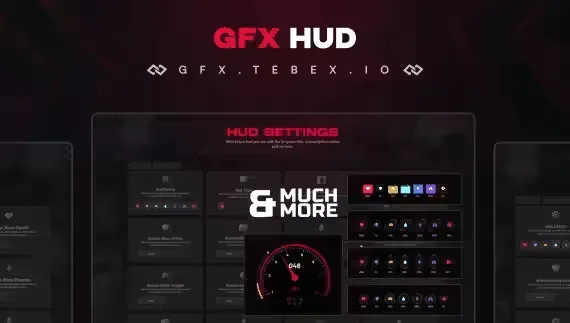
GFX Advanced HUD - The Ultimate HUD Solution for Your FiveM Server!
🚀 Transform Your FiveM Server with GFX Advanced HUD Introducing the GFX HUD Script, a fully customizable and advanced HUD system tailored for your FiveM server. Compatible with both ESX and QB-Core frameworks, this script empowers your server with modern visuals and unique features. Adjust everything effortlessly using the config file to match your community's needs.
👉 Available exclusively on GFX Store - Get it today!
🔥 Key Features That Enhance Gameplay
🖥️ HUD Display Elements
- Character Stats Monitoring: Track vital stats like Health, Armor, Hunger, Thirst, Energy, Stamina, and Mental Health with 4 distinct design options.
- Enhanced Map Display: Showcase location and time for a more immersive experience.
- Key Bind Display: Display essential key bindings directly on-screen for player convenience.
- Vehicle HUD: Detailed vehicle information, including a responsive Nitro gauge.
🎨 HUD Customization Menu
- Color Customization: Adjust status indicator colors to suit your preferences or server theme.
- Flexible Layout: Rearrange HUD elements to align with individual player needs.
- Visibility Controls: Show or hide HUD components to tailor the display.
- Diverse Styles: Choose from 4 unique designs for character status boxes in the settings menu.
💡 Why Choose GFX Advanced HUD Script?
- Fully customizable via an intuitive config file.
- Designed to elevate your server's user experience.
- Compatible with ESX and QB-Core for seamless integration.
- Don’t miss out on this game-changing script! Available now on GFX Store.
- Give your players the modern, user-friendly HUD they deserve. Transform your server with the GFX HUD Script today!
FREE GFX Advanced HUD installation for FiveM servers
FREE GFX Advanced HUD is a FiveM script from GFX Development in the ESX Scripts category.
After checkout, download the resource package from your Tebex order email, upload the included folder to your server, and start it from server.cfg.
resources/ directory.
ensure line using the exact folder name shipped in the download.
Use this as the server.cfg pattern. Replace the folder name if your downloaded resource folder is different:
ensure free-gfx-advanced-hudThe previous generated tebex-... prefix has been removed here because the real folder name is controlled by the download package, not by this product page.
Why FREE GFX Advanced HUD fits a FiveM server
Framework labels for this listing: esx, qbcore, qbox. Check the included readme for any product-specific setup notes.
FREE GFX Advanced HUD compatibility and specs
Related scripts



![Lore-Friendly Police Vehicle Pack [8 Vehicles]](/uploads/card/9d6c5ae77714e63c6b00c1694bd0506c.webp)







About this FiveM script
FREE GFX Advanced HUD is a premium FiveM script for esx, qbcore, qbox servers. It’s part of the Tebex catalog, a curated selection of battle-tested resources for QBCore, ESX and Qbox roleplay servers. Every script on Tebex ships with lifetime updates, instant email delivery, and a ticket system for technical support.
Whether you’re building a QBCore server from scratch, upgrading an ESX Legacy deployment, or migrating to Qbox, this resource drops in cleanly and runs at 0.00ms idle resmon. The config-first design means you can customize prices, permissions and locations without touching the core Lua.